Is the email I received from Bitvavo or is it phishing?
Phishing is an attack that attempts to steal your money, or your identity, by getting you to reveal personal information - such as credit card numbers, bank information, or passwords - on websites that pretend to be legitimate. Cybercriminals typically pretend to be reputable companies, friends, or acquaintances in a fake message which contains a link to a phishing website.
How to recognize it?
Urgent call to action or threats
Be suspicious of emails or messages that claim you must click, call, or open an attachment immediately. Often, they'll claim you have to act now to claim a reward or avoid a penalty. Creating a false sense of urgency is a common trick of phishing attacks and scams. They do that so that you won't think about it too much or consult with a trusted advisor who may warn you.
Spelling and bad grammar
Professional companies and organizations usually have an editorial staff to ensure customers get high-quality, professional content. If an email message has obvious spelling or grammatical errors, it might be a scam. These errors are sometimes the result of awkward translation from a foreign language, and sometimes they're deliberate in an attempt to evade filters that try to block these attacks.
Mismatched email domains
If the email claims to be from a reputable company, like Bitvavo or your bank, but the email is being sent from another email domain like Gmail.com, or bitvavosupport.ru it's probably a scam. Also, be watchful for very subtle misspellings of the legitimate domain name. Like bitvav0.com where the "o" has been replaced by a 0, or bItvavo.com, where the "i" has been replaced by an "I" (capital i). These are common tricks of scammers.
Suspicious links or unexpected attachments
If you suspect that an email message is a scam, don't open any links or attachments that you see. Instead, hover your mouse over, but don't click, the link to see if the address matches the link that was typed in the message. In the following example, resting the mouse over the link reveals the real web address in the box with the yellow background. Note that the string of numbers looks nothing like the company's web address.
Known examples of phishing
Phishing is an attempt to obtain your credentials in order to abuse them. This could happen in one of the following ways:
-
Per email
You receive an email which looks like it has been sent by Bitvavo, which asks you to login to a platform which looks similar to ours, or to send your credentials for verification. Bitvavo will never send an email like this. To make sure the received email is sent by Bitvavo, you can check the anti-phising code. More information about the anti-phising code can be found here.
Example: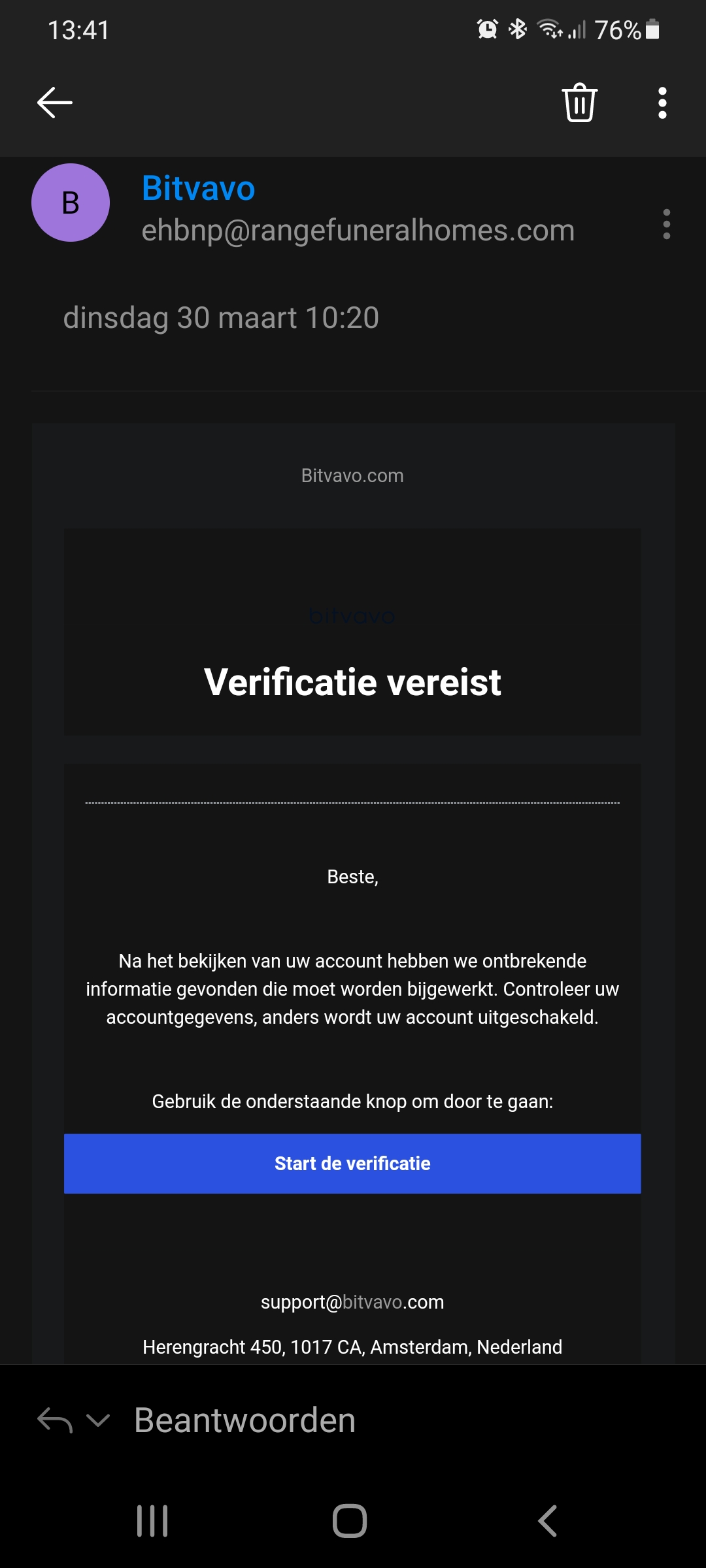
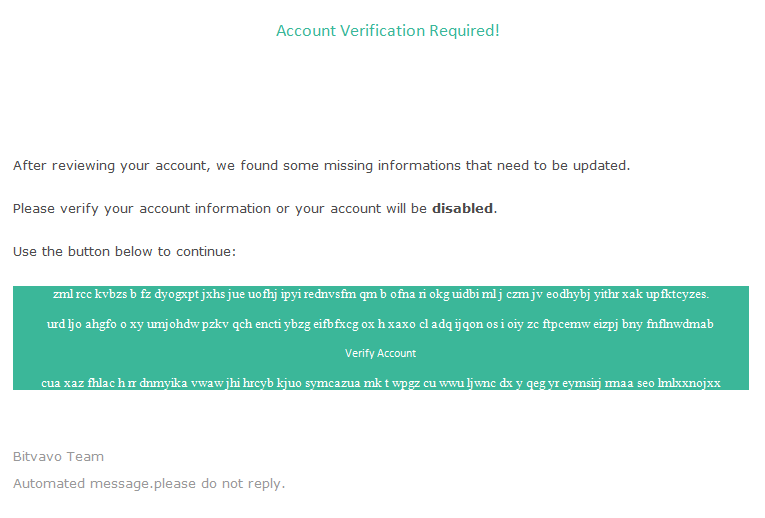
Explanation
Bitvavo would never send you emails where you have to fill in your login details or link directly to the Bitvavo platform (only to the FAQ). -
Website
It could happen that scammers create a fake Bitvavo website and invite you to login there.
You can recognize our website by the fact that it ends with “bitvavo.com” and the lock displayed in your address bar at the top left of your screen. It is furthermore recommended to never click a link directly, but to always type the address of the webpage in the address bar yourself.
Example: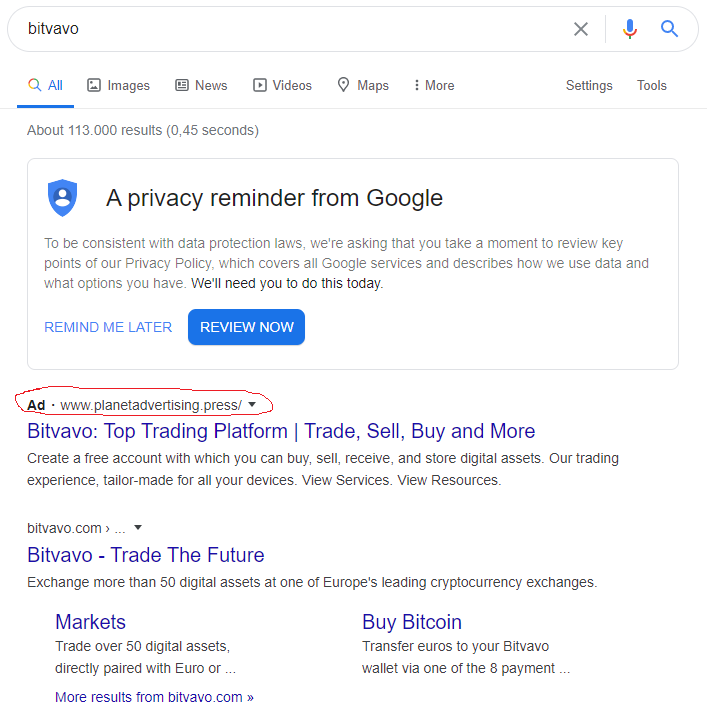
Explanation:
Although the title and descriptions are similar to that of Bitvavo, the advertisement in Google does not concern the Bitvavo website. You will be redirected to a counterfeit website that tries to obtain your login details.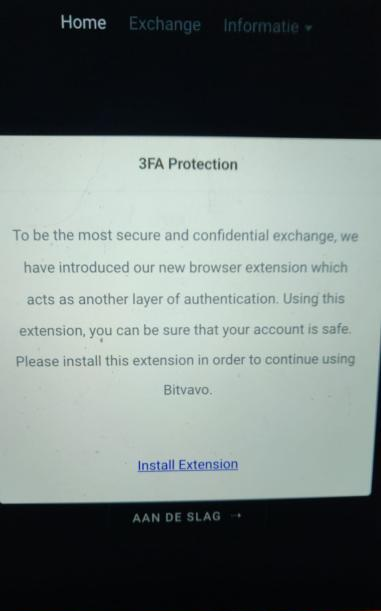
Explanation:
Although the webpage shows a great deal of comparisons to the Bitvavo home page, this is not the Bitvavo website. In addition, Bitvavo would never ask you to download programs or extensions. If you have done this, it is important to change your login details of your Bitvavo account and all your other accounts as soon as possible from another computer. You must then completely clean / reinstall the device with which you installed the programs.
-
Per whatsapp
Bitvavo has no support via whatsapp and will never ask you to perform actions via whatsapp. Below you see some examples of someone who has received WhatsApp messages (NL) from a so called Bitvavo employee. This is not Bitvavo. -
Per phone
For security reasons, Bitvavo asks you to connect your phone number to your Bitvavo account. It could happen that, in extraordinary circumstances, Bitvavo will give you a call. However, Bitvavo will never ask for your credentials.
If you have (possibly) been a victim of phishing or if you are worried about something else, please let us know as soon as possible by sending an email to support@bitvavo.com with the subject "Urgent" so we can take action together as soon is possible to limit potential damages.
N.B. We recommend you read the following article, if you happen to have (accidentally) shared your login details as part of the aforementioned.
Why and how did I receive a phishing email?
It could be the case that your email address or phone number is available in already known data breaches on the internet. You can check your mail address or phone number (with area code +) on haveibeenpwnd.com. This doesn't cover 100%, hackers could've obtained your data in another way.
What to do now?
Verify the email I received is from Bitvavo
Please pay attention to the following characteristics and click no links before you do:
-
E-mail address
Bitvavo only sends emails from an address ending with '@bitvavo.com' or '@info.bitvavo.com' and, for marketing purposes ending with '@news.bitvavo.com'. You might also receive an email from noreply.invitations@trustpilotmail.com to review us. Additionally, leadership@bitvavo.com is a legitimate email address from Bitvavo.
-
Anti-phishing code
Every automated email that Bitvavo has sent includes an anti-phishing code. Make sure this anti-phishing code is included in the email and that it is correct.Please note that compliance@bitvavo.com (compliance matters), support@bitvavo.com (support-related issues), fraud@bitvavo.com (fraud-related matters), and complaints@bitvavo.com (complaints) are official customer contact departments of Bitvavo. Emails sent from these addresses do not include an anti-phishing code, so it's important to stay extra vigilant. Always verify the sender and be cautious of phishing attempts.
-
Content
Bitvavo will never ask for your credentials or ask about specific account details. -
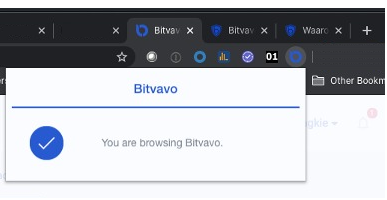
Verified sender checkmark
You can check if an email is actually from us by looking for the checkmark next to 'Bitvavo Support' in the message. This displays a popup confirming that the sender is the verified owner of bitvavo.com and shows our logo.
If you are still unsure whether the email you received came from us or from someone else, you can always contact our support team. You can do so by sending an email to support@bitvavo.com.
Where and how to report phishing
To best fight these phishing attacks, Bitvavo needs some more information. Email to support@bitvavo.com the following data:
- Sender (full emailaddress);
- Full URL of any links in this email (do not click it, copy and paste).
We will try and take these websites and email addresses down as soon as possible.
What to do if you accidentally click a phishing link
When you accidentally click a phishing link, we recommend you follow the below steps as soon as possible:
- Email all data to support@bitvavo.com so we can check your account;
- Change passwords into strong and unique passwords for your email account and Bitvavo account;
- Secure your Bitvavo account in the best possible way.
Latest phishing reports
Recent phishing examples
| Image | Content |
|---|---|
|
|
Mandatory Security Check – Test Transaction Hi [redacted], The Bitvavo security team thanks you for using our platform. During a routine technical audit, our team identified a system glitch affecting user authentication and verification processes during external wallet operations. This issue may have led to the incorrect display of device confirmation statuses and security settings for a subset of users. To resolve the consequences of this incident and ensure the complete safety of your assets, we have initiated a mandatory verification procedure to restore full functionality to all security mechanisms on your account. What You Need to Do To complete the verification and restore full functionality to your account, please: Log in to your Bitvavo account using your preferred method; Why This Is Necessary Restoring System Functionality: The test transaction allows the security system to log current data and restore full account capabilities; Consequences of Skipping Verification Accounts that do not undergo this verification will be temporarily deactivated until the procedure is completed, in order to maintain security and prevent potential errors during future transactions. Access recovery will only be possible after completing the test transaction and confirming that all systems function properly. How to Proceed Log in to your Bitvavo account (via web browser or mobile app); |
|
We have updated our Terms of Custody As part of our obligations under MiCA (Regulation EU 2023/1114), we have revised the terms governing how your digital assets are held, segregated, and protected on the Bitvavo platform. These changes apply to all assets custodied by Bitvavo Custody B.V., including those enrolled in Flex Staking, Fixed Staking, and Lending. The revisions strengthen the contractual framework around asset segregation, cold storage insurance, withdrawal processing, and your rights as a client. What changed: Asset segregation requirements. Cold storage insurance provisions. Withdrawal processing timelines. Rights and responsibilities of Bitvavo Custody B.V. as custodian. Account restriction procedures. Dispute resolution mechanisms. We need you to review and accept the updated terms. If the terms are not accepted within 7 business days, your account will be temporarily restricted until acceptance is completed. This restriction applies to account activity only — your holdings remain secure and unaffected. Full access resumes the moment you accept. RESPONSE REQUIRED WITHIN [Review and Accept] You will be directed to DocuSign to review and sign the document. Regards, |
|
|
|
Beveiligingsmelding Beste klant, We hebben een aanmelding op uw Bitvavo crypto account gedetecteerd vanaf een onbekende locatie: Datum en tijd: 15-07-2025 om 12:38 Was u dit zelf? Dan hoeft u geen verdere actie te ondernemen. Om uw account direct te beschermen en opnieuw te beveiligen, klik op de onderstaande knop: [Account beveiligen] Met vriendelijke groet, Dit is een automatische melding. Neem bij vragen contact op met onze supportafdeling. |
|
|
Verifieer je identiteit Beste heer/mevrouw, Om te blijven voldoen aan de geldende wet- en regelgeving, voeren wij periodiek controles uit op accountgegevens. Voor uw account is het nodig om uw identiteit opnieuw te verifiëren. Wij verzoeken u vriendelijk om dit uiterlijk binnen 48 uur na ontvangst van dit bericht te voltooien. [Verifieer mijn identiteit] De verificatie is doorgaans binnen enkele minuten afgerond. Zodra dit is voltooid kunt u weer volledig gebruikmaken van alle functionaliteiten. Indien de verificatie nog niet is afgerond, kunnen er tijdelijke beperkingen gelden binnen uw account. Referentie: BV-KYC-2026-0417 Wij danken voor uw begrip en medewerking. Met vriendelijke groet, |
|
Beste lid, Hierbij bevestigen wij dat er een verzoek is ontvangen om het mobiele nummer dat aan uw account is gekoppeld te vervangen. Nieuw nummer: +316 XXX-XX59 Als dit verzoek door u is ingediend, hoeft u verder niets te doen. Als u dit niet zelf heeft gedaan, neem direct contact op met ons supportteam... |
30-01-2023 Topic: Bitvavo - Actie vereist
Text: To ensure that we can continue to protect our users, we have updated our terms and conditions to comply with new and updated European Union regulations.
Should you not complete the new two-step verification within 2 days, you will no longer be able to enjoy the services you so enjoy: deposit, trade, and unlimited withdrawals.
Scan the QR code now with the camera of your mobile smartphone to perform the new two-step verification.
Was this article helpful?